Autodesk releases a server for Revit 2027 that lets AI modify models through plain-language requests
01
Story of the week
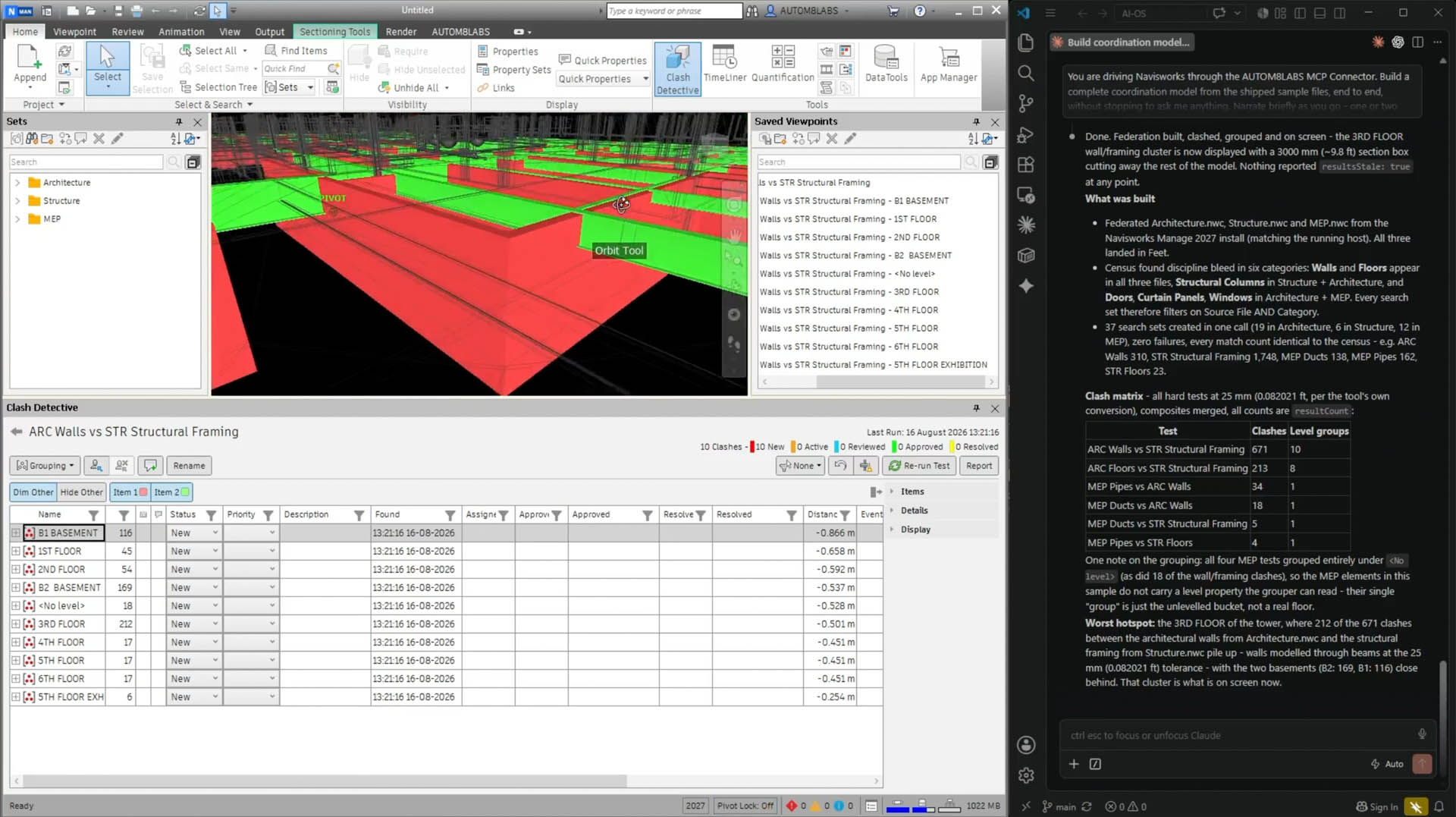
Autodesk has released a server for Revit 2027 that lets an AI assistant query and change models without opening menus or dialog boxes. A project architect can ask it to list every room below a set area, or apply fire ratings across all interior doors in a schedule, and the changes happen. The AI runs commands inside Revit the way a person at a keyboard would. The same week, HP released a workstation with up to 192GB of unified memory capable of running large AI models locally, keeping project data off third-party servers. For firms working under NDA, or with clients who restrict where project files can travel, local processing matters. The server uses an open standard, meaning other tools can connect to it on the same terms. AUTOM8LABS already has a connector for Navisworks that works this way, letting a BIM coordinator run clash tests and export unresolved issues as a BCF file through plain-language instructions. The HP story is sponsored content, so hardware claims warrant independent checking before a purchase decision.
02
Themes
No major insurer has added AI exclusions to architect PI policies, and commercial general liability is a different situation
AXA XL confirmed this week it is not adding AI exclusions to professional liability policies for design professionals, and no major insurer appears to have done so. The policy language is, in AXA XL's words, 'agnostic as to how the matter occurs,' meaning a claim arising from AI-assisted work gets evaluated under the same terms as any other. Commercial general liability is moving faster. The Insurance Services Office has flagged AI exclusions beginning to appear there, and broker Arthur J. Gallagher notes those gaps can affect claim outcomes, contract compliance, and bid eligibility with public owners. Law firm Shumaker expects dedicated AI endorsements to replace the tacit coverage inside existing E&O policies over time. Your insurer has no visibility into how your staff uses AI unless you provide it.
Running AI on the workstation keeps client data off third-party servers
Two items this week pointed at the same question. HP's new ZBook Ultra G3a has enough memory to run large AI models on the machine itself. Autodesk's Revit 2027 server uses an open standard that lets a locally-running AI control the software through plain-language requests. Together they describe a workflow where AI-assisted model queries, specification drafting, and code checking happen without project data touching a cloud server. Most firm workstations run on three-to-five-year refresh cycles, and machines bought in 2023 were specced before local AI processing was a real consideration. GPU memory is worth adding to the criteria for the next hardware round. The HP piece is sponsored content, so the specific hardware claims are worth checking independently.
Two practitioners made the same case this week for keeping a human hand in AI-assisted work
A Tulane fellow used AI for early form-finding on a speculative city project, then drew everything himself. His reasoning: authorship survives when the human stays in the drawing process. Common Edge reached the same point from a staffing angle, noting that when AI handles production drafting, supervisors lose their clearest signal about whether a junior designer understood the work or managed a tool that produced convincing output. A more capable AI makes that gap harder to detect. Common Edge proposed building structured review into assignments, asking beginners to compare generated options and explain their choices out loud. Firms using AI in production are having to rebuild the feedback loops that hands-on drawing provided automatically.
Blueprints AI went public claiming permit-ready drawings from a photo, and clients will notice
A bootstrapped startup in Santa Monica launched publicly this week saying it can turn a photo, PDF, or sketch into code-compliant construction drawings in minutes. Pricing is unpublished. Which jurisdictions' codes the tool actually covers is unspecified. The stamp, E&O liability, and professional judgment required for permit submission all stay with the architect of record. PI policies currently cover AI-assisted work under existing terms, terms written before clients started arriving with AI-generated drawing sets and questions about what the architect adds. Residential and small commercial firms will likely hear about this product from clients before the year ends.
03
Notable tools
-
Tooling
Autodesk Revit 2027 MCP server
Lets an AI assistant query and modify a Revit model through plain-language requests, without dialog boxes. Ask it to list rooms below a given area or update fire ratings across a door schedule. Requires Revit 2027. -
Tooling
AUTOM8LABS MCP Connector for Navisworks
A BIM coordinator can instruct it to run a Structure vs MEP clash test, group results by level, or export unresolved clashes as a BCF file, all through plain-language requests. Reported in the same HP-sponsored piece, so worth independent verification. -
 Practice
Blueprints AI
Claims to generate code-compliant construction drawings from a photo, PDF, or sketch in minutes. No pricing published, no list of covered jurisdictions. Worth knowing about before clients bring it up. -
Tooling
Perplexity Computer for HP ZBook Ultra G3a
Lets staff download and run large AI models locally, with a read-only connection to Revit 2027 and purpose-built features for code compliance checking and material specification research. Requires the HP ZBook Ultra G3a hardware.
Three of this week's four notable tools come from a single AEC Magazine sponsored piece. Each entry flags that. The Revit 2027 server is independently verifiable and worth tracking regardless of the hardware context. Hardware claims from the HP piece warrant checking against non-sponsored sources before any purchase decision.